A Paint Bible
An interactive paint database and palette builder for artists.
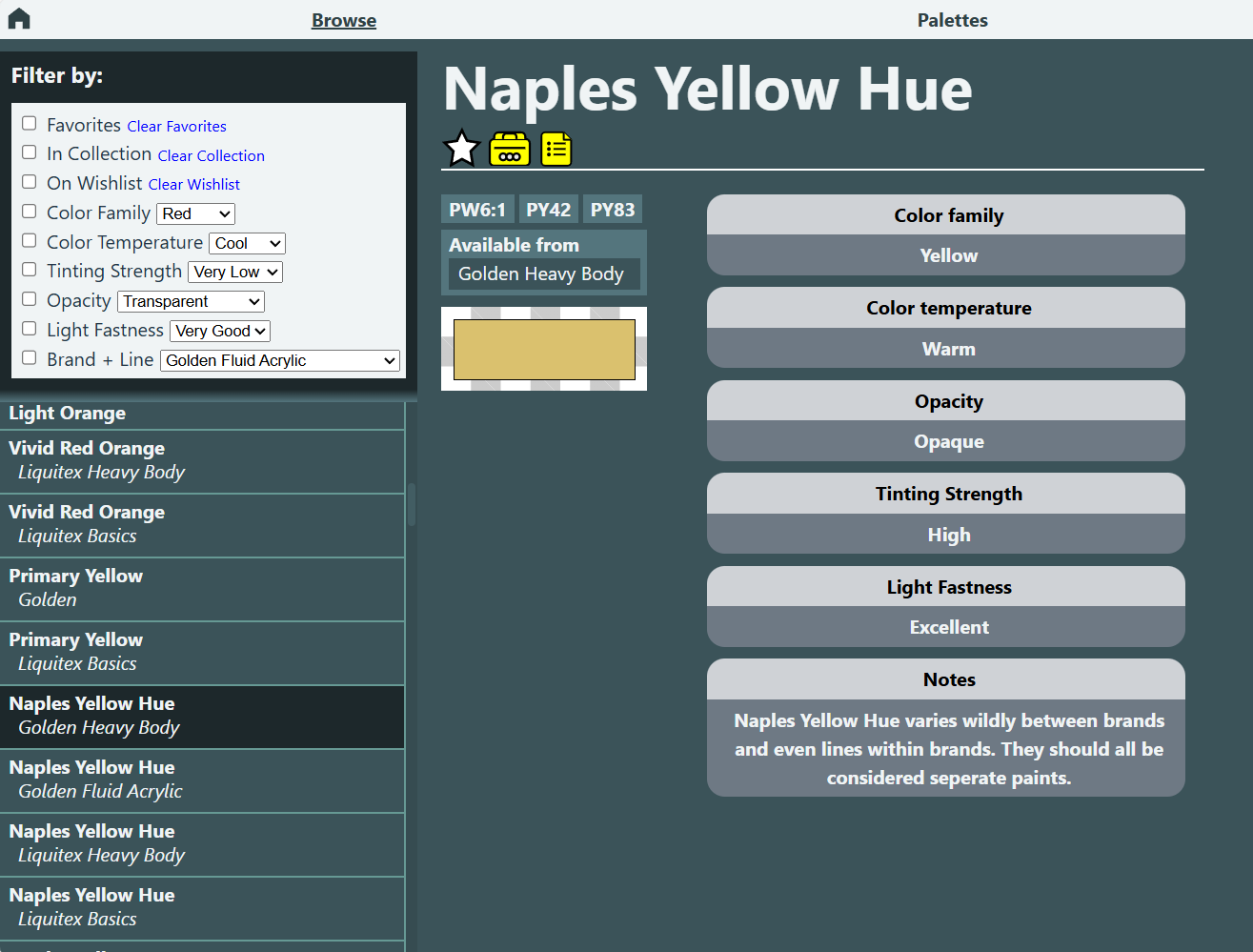
A Paint Bible is a React-based application designed to help artists manage paint collections and build color palettes while exploring a structured database of over 100 paints. The project involved designing a flexible, consistent data model and building an interface that makes complex color and paint information intuitive to navigate, particularly for artists.
Key Features
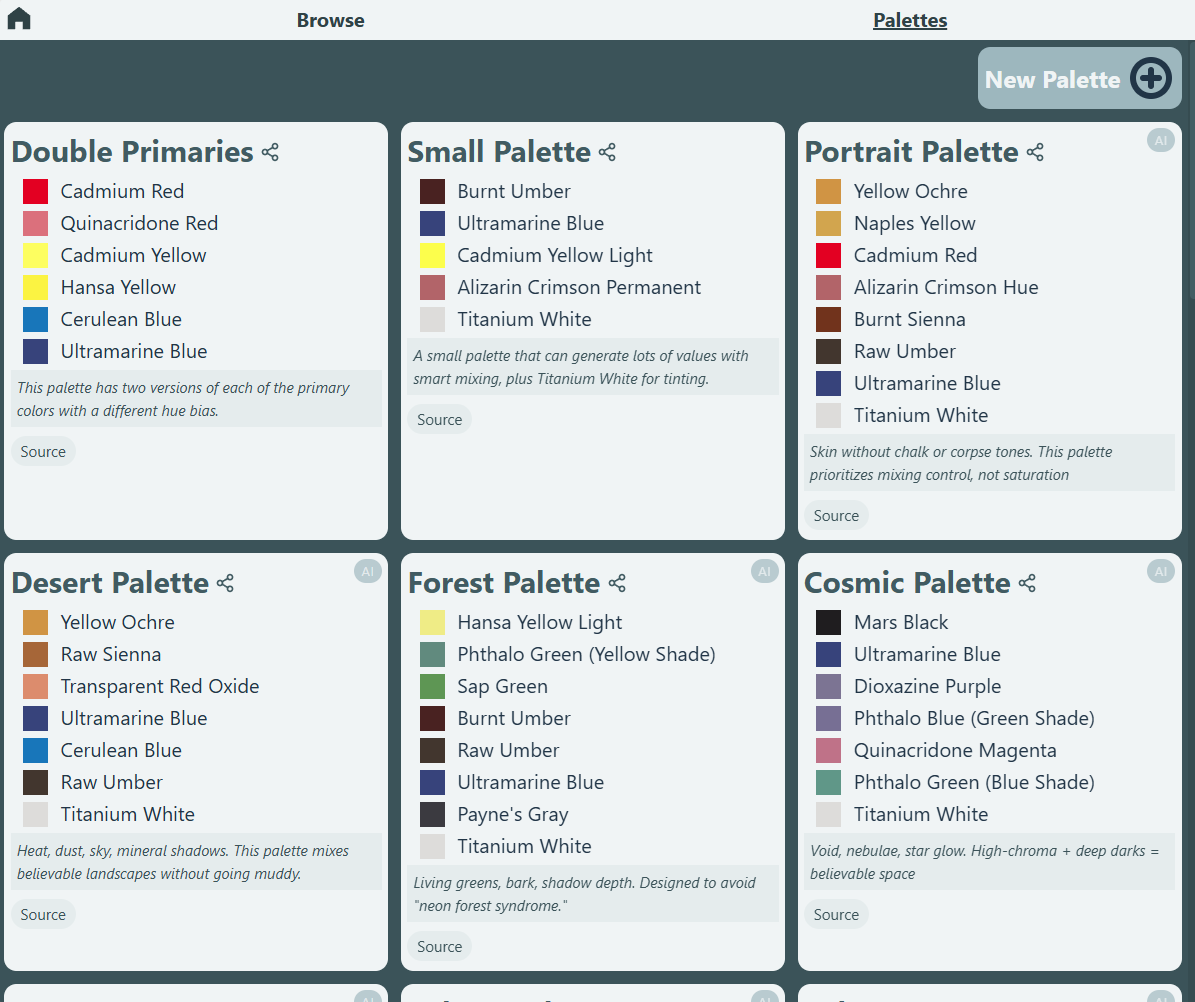
Create, edit, and manage custom color palettes
Maintain a personal paint collection and wishlist
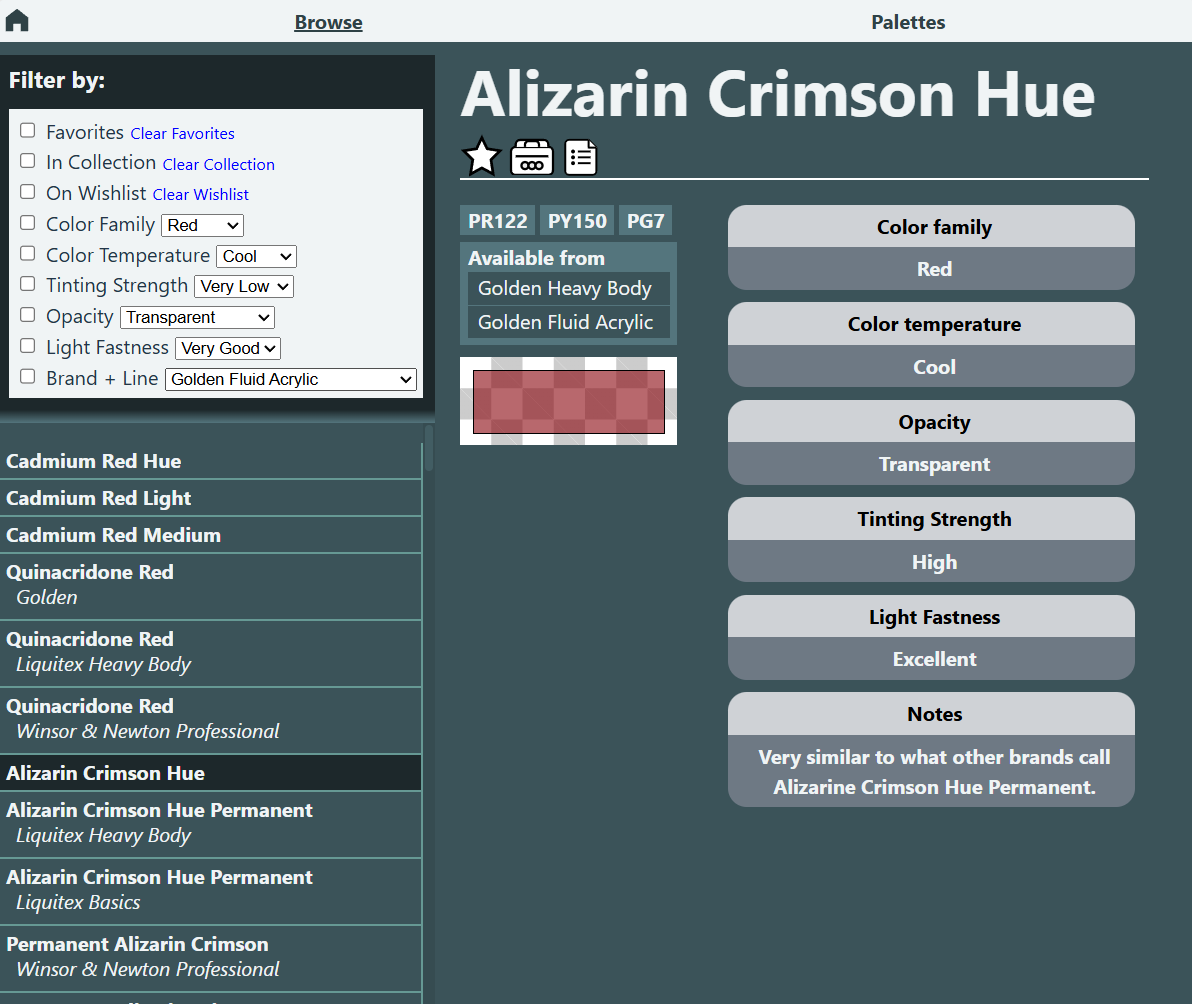
View paint metadata including pigment, opacity, tinting strength, and color temperature
Automatic paint suggestions
Persistent user data stored locally in the browser
Shareable palette links via URL parameters
Technical Overview
Built using React with a component-based architecture
Custom data models for Paints, Palettes, and User data
Global state shared using React Context
Persistent storage implemented using localStorage
Dynamic palette and paint data loaded from structured JSON
URL parameter support for loading shared palettes
Emphasis on modular, maintainable data structures
Challenges and Problems
Designing a data model flexible enough to accurately represent the complex, sometimes inconsistent, data space of commercial acrylic paints.
Managing shared state across multiple UI components. This is where React Context saved the day.
Preventing unnecessary re-renders by maintaining immutable data structures and utilizing memoization
Designing a palette editor that supports both creation and editing without duplicating UI or workflows
Separating persistent data from temporary UI state using an MVC-like architecture
Building a paint suggestion system powered by tokenization and light fuzzy search based on paint metadata
Designing the application and JSON so that palette data, paint data, and user data could evolve independently without breaking existing palettes.
Deeper Dives
Suggestion Engine
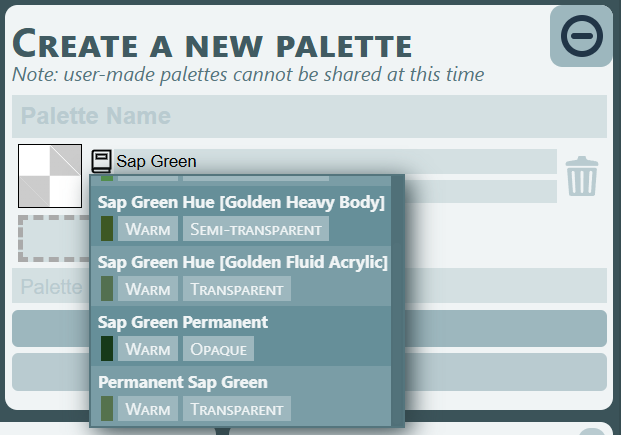
The suggestion engine was designed to solve two main problems. First, users may not know the exact name of the paint they are looking for and may instead search for something like “warm green.” Second, paint naming conventions are often inconsistent between brands. For example, one brand may label a paint “Iron Oxide Red” while another labels a nearly identical paint “Red Iron Oxide.”
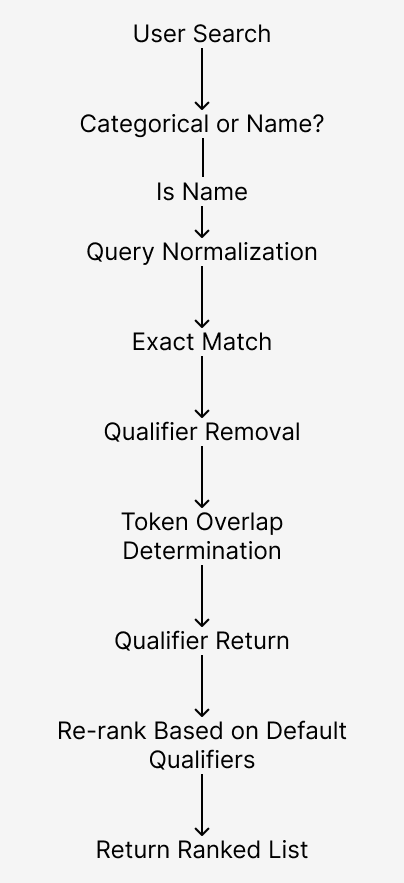
To handle this, the engine uses a layered search approach that progressively moves from exact matching to more flexible matching. The first step is determining whether the user is performing a categorical search (such as “cool blue”) or searching for a specific paint name (such as “Ultramarine”).
Categorical searches are handled by tokenizing the search string and using those tokens as metadata filters, allowing the system to return paints that match properties such as color family or temperature.
Searches for specific paint names require a more flexible approach. The engine first performs an exact match search. Any matches are added to the results and removed from the search space. Next, an overlap search is performed by tokenizing both the search term and the remaining paint names and comparing token overlap. This allows searches like “Red Oxide” to correctly match “Oxide Red” or “Red Iron Oxide.”
However, this approach alone can produce incorrect matches when common qualifiers are present. For example, “Phthalo Blue Red Shade” could incorrectly match “Ultramarine Blue Red Shade.” To prevent this, known qualifiers such as “Red Shade,” “Blue Shade,” “Permanent,” and “Hue” are temporarily removed before token comparison, then reintroduced later to refine the results.
Ranking naturally emerges from the layered search order, moving from exact matches to progressively more flexible matches. However, certain paints have culturally assumed default qualifiers. For example, “Ultramarine Blue” is generally assumed to mean “Ultramarine Blue Red Shade,” not “Ultramarine Blue Green Shade.” The engine accounts for this by applying a set of known default qualifiers to adjust ranking before returning the final list of suggestions, ordered from strongest to weakest match.
The Suggestion Engine returns multiple suggestions with slightly different names, ranked by match strength
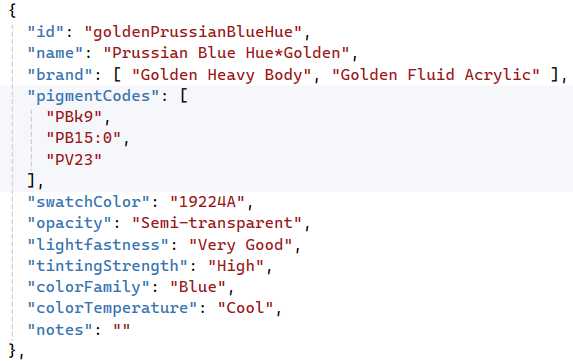
Each paint is stored as a structured JSON object with standardized fields. This structure allows paints from different brands and lines to be compared, filtered, and suggested using the same underlying data model.
Data Conditioning and Modeling
The data underlying the application was the most important part of the project. For the application to be useful, the data needed to be accurate and applicable to real-world paint purchasing and use. This presented two main problems: the data space of commercially available acrylic paints is enormous, and the data itself is often both redundant and inconsistent.
To address the size of the data space, I defined a hard boundary for data collection. The database includes three of the most commonly available brands, and within those brands, the two most commonly available lines. These include Golden Heavy Body and Fluid Acrylics, Liquitex Heavy Body and Basics, and Winsor & Newton Professional and Galeria. These lines were selected because they are widely available at major art supply stores and represent the paints students and emerging artists are most likely to encounter. Boutique or difficult-to-obtain brands were intentionally excluded, since artists seeking those paints are typically established professionals who would likely not need this tool. Non-extant paints were also excluded because while the information may be interesting it is not useful or practical.
The second problem, data redundancy and inconsistency, was a little trickier. Paints that are materially different may share the same commercial name, not just across brands but even across lines within the same brand. For example, Liquitex offers Naples Yellow Hue in both the Heavy Body and Basics lines, but each has different tinting strength and lightfastness ratings. Conversely, there are paints that are functionally very similar but marketed under slightly different names, such as “Red Iron Oxide” and “Iron Oxide Red,” or “Viridian” and “Viridian Green Hue.”
This created both a presentation problem and a balance issue between data bloat and incomplete data. The solution was to rely on the surfaced paint properties: pigment schedule, color family, opacity, color temperature, tinting strength, and lightfastness. If any of these properties differed, paints with identical names were treated as separate entries. If the surfaced properties were identical, the paints were merged into a single entry with multiple brands or lines listed.
The “tinting strength” field presented another normalization issue. Some brands list tinting strength numerically, while others use descriptive rankings. To normalize this field, numeric values from 0–100 were mapped to ranked categories: Very Low, Low, Medium, High, and Very High.
To ensure accuracy, all of the paint data was hand-collected and transcribed from manufacturers’ catalogues and personal and community experience. Each paint entry is stored as a JSON object with standardized fields.
To keep the model flexible and expandable, the application automatically derives filter value sets from the body of paint data itself. Filter options such as color family are not hard-coded; they are generated dynamically from the dataset. This means that if new paints are added to the database with new categories, the interface updates automatically without requiring changes to the application code.
UX and Design
The interface was designed to be simple and easy to scan. While browsing paints, the UI prioritizes color visibility and surfaces the metadata most useful to artists. In Palette Mode, the focus is on seeing palette colors grouped together for quick visual comparison.
The Palette Editor supports both creating and editing within the same interface, reducing the number of workflows the user has to learn while maintaining flexibility. The editor was designed to be quick, with an intuitive layout and keyboard shortcuts for common actions.
The goal was to build a tool that flowed the way an artist works in their head, stayed fast and lightweight, and handled complex, sometimes inconsistent, real-world paint data, in a logical, extensible way.
See the app in action: